From payment setup to payout
Payment methods, checkout, discounts, Lymonah Pay and orders in one connected workflow.
Payment methods for your market
Eligible accounts can use Lymonah Pay, or connect a supported gateway for their country. Buyers pay with mada, Apple Pay, Visa or Mastercard, depending on the gateway.
- Lymonah Pay for eligible accounts
- Tap, Stripe, PayPal and StreamPay connections
- Tamara and Tabby buy-now-pay-later options
- Bank transfers, local methods and manual confirmation
One checkout for every product
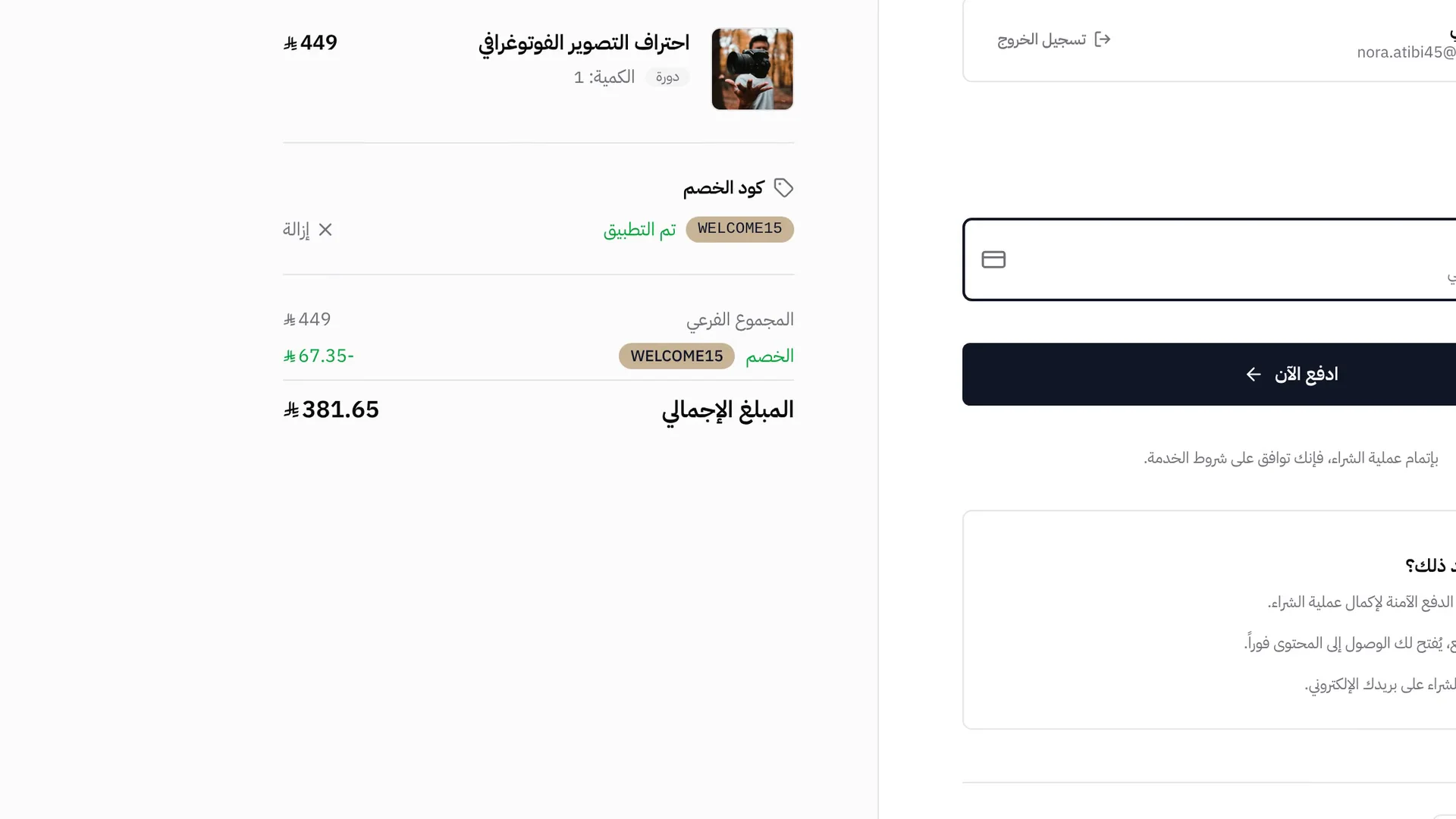
Courses, digital products, memberships and bundles use the same branded checkout. Buyers review the order, enter a coupon and choose an available payment method.
- Product and total shown before payment
- Coupon entry inside checkout
- Guest contact details and account matching
- Payment options based on the platform setup
Discounts with clear limits
Set a percentage or fixed discount, choose the products, and define date and usage limits. Status and usage stay visible in the promotions list.
- Percentage or fixed-amount discounts
- Start and expiry dates
- Total and per-customer usage limits
- Product-specific and campaign-link promotions
Lymonah Pay: payments and payouts
Eligible accounts can collect payments and follow payouts with Lymonah Pay. Each payment shows the amount, fees, net earnings, refund hold and payout status.
- Payment amount, fees and net earnings
- Buyer and card method on every payment
- A countdown of the refund hold left on each payment
- Available, pending and paid-out balances
Every order in one record
The buyer, product, amount, payment method, coupon and status stay together. Refunds and manual-payment reviews use the same order record.
- Paid, pending, failed and refunded states
- Subtotal, discount, tax and final total
- Payment method and card details when available
- Refunds and manual-payment review
More controls for payments and orders
Pricing, collection, access and reporting stay connected to each order.
Prices in selected currencies
The storefront can show converted prices in the currencies you select, while the platform keeps its configured base currency.
Buy now, pay later
Tamara and Tabby can appear for eligible orders when the provider is connected and supports the buyer’s market.
Manual and local payments
Bank transfer, local wallet instructions, WhatsApp or a direct link can collect proof for manual review.
Automatic access after payment
A successful payment grants the purchased access and records the buyer without a separate enrolment step.
Clear tax and discount totals
The order keeps subtotal, discount, tax and final total as separate values for review and reporting.
Refunds from the order record
Supported online payments can be refunded from their order, with the refunded status kept in the same record.
Abandoned-cart follow-up
Unpaid carts can enter a recovery workflow with timed messages and a coupon when you choose to add one.
Revenue and order reporting
Reports connect revenue, orders, products, payment methods and refunds without a separate spreadsheet.
Frequently asked questions
- Which payment methods can buyers use?
- The platform supports Lymonah Pay for eligible accounts and connections for Tap, Stripe, PayPal, StreamPay, Tamara and Tabby. Manual bank transfers, local methods, WhatsApp and direct links are also available. The methods shown at checkout depend on your setup, country and provider account.
- Does Lymonah support mada and Apple Pay?
- Yes. mada, Apple Pay, Visa and Mastercard are available through StreamPay, and Apple Pay, Visa and Mastercard through Tap. Tamara and Tabby add buy-now-pay-later options for buyers in Saudi Arabia, and Stripe and PayPal take international cards and PayPal accounts.
- Is Lymonah built for the Saudi market?
- Yes. Lymonah is a Saudi platform built for creators, trainers and training centres in Saudi Arabia: Arabic first, prices in Saudi riyals, mada and Apple Pay at checkout, Tamara and Tabby instalments, and a National Center for e-Learning app for training entities that report to the center. It also serves sellers in the Gulf and Egypt.
- Do I need my own payment gateway account?
- It depends on the collection route. Lymonah Pay manages collection for eligible accounts. An external gateway requires your own provider account and connection details.
- Can the storefront show more than one currency?
- Yes. The platform has a base currency, and the storefront currency switcher can show converted prices in the display currencies you select when this setting is enabled.
- Can buyers pay in instalments?
- Tamara and Tabby provide buy-now-pay-later options when connected. Eligibility, supported countries, currencies and order limits are decided by the provider.
- What limits can I set on a coupon?
- A promotion can be a percentage or fixed amount, apply to selected products, start and expire on set dates, and carry total and per-customer usage limits.
- When does the buyer receive access?
- Online purchases grant access after the payment succeeds. A manual payment grants access after you approve the submitted payment.
- Can I refund an order?
- Supported online payments can be refunded from the order screen. Availability and fees depend on the payment route and provider. Manual payments are handled outside the gateway and recorded through the order workflow.
- Where can I review payment performance?
- The orders and reports screens show revenue, order status, products, discounts and refunds. Lymonah Pay accounts also have payment and payout views.
Explore more of the platform
- Sell online courses
- Sell digital products
- Sell memberships and subscriptions
- An Arabic learning management system
- Build your website and its pages
- Learner communities
- For coaches and consultants
- For educators and training centres
- For creators building an audience
- For organizations and corporate training teams
- How selling a course actually works
- Compare Lymonah with other platforms
- Everything the platform does
- Payment, advertising and email integrations
- See pricing