Let Your AI Assistant Work Inside Your Platform
Connect the assistant you already use to Lymonah. Ask it to build courses, publish pages, change prices or read your numbers, directly in your workspace.
Start free
What it can do in your account
These are actions it can carry out, not suggestions you copy into a form.
Build the course
Create chapters, lessons, quizzes and questions from a request.
Publish the offer
Create products, set prices, add coupons and publish landing pages.
Read the numbers
Answer questions about revenue, orders and learner progress from live data.
Handle the admin
Enrol learners, issue certificates and import a cohort.
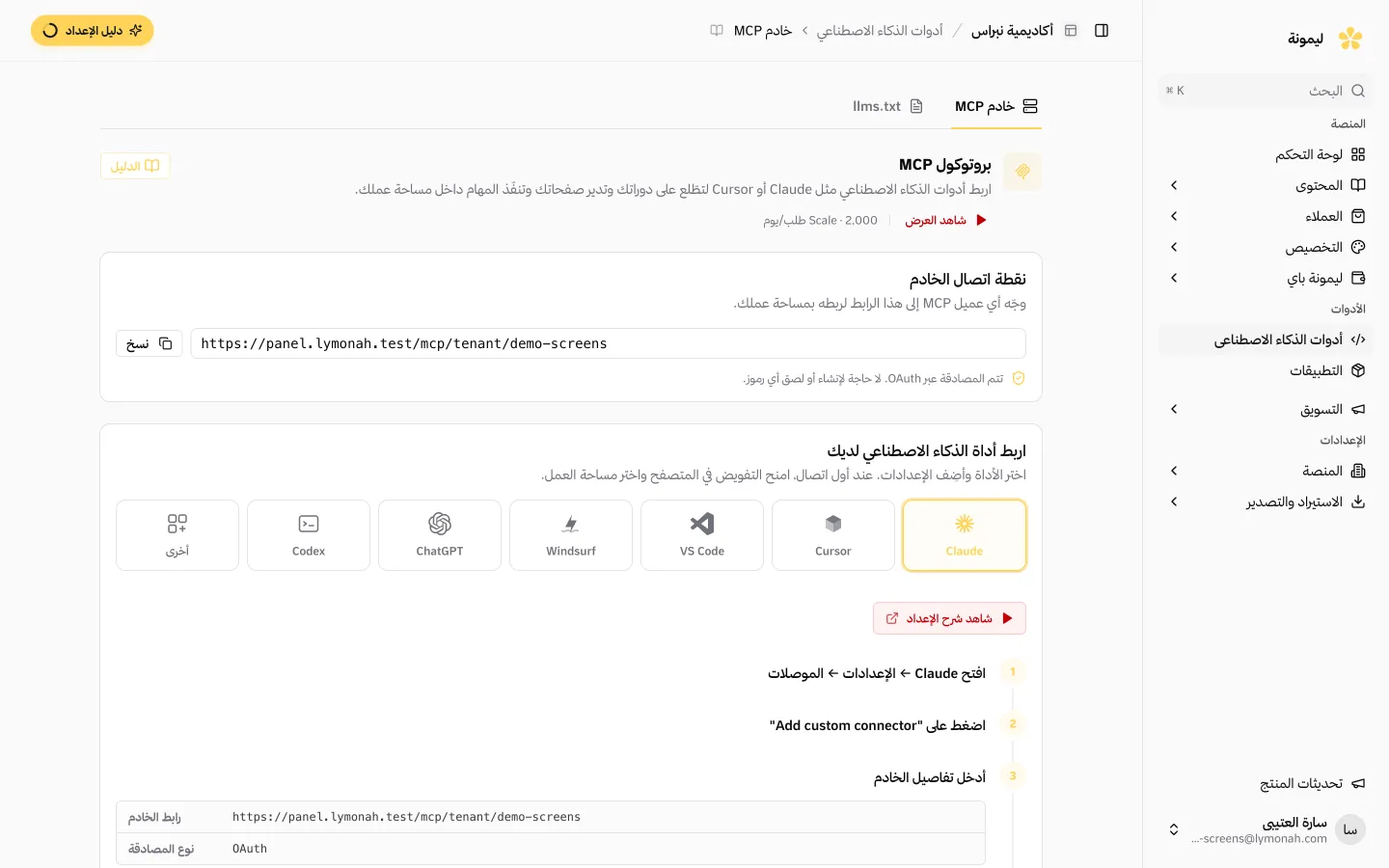
Connect Claude, ChatGPT, Cursor or another MCP-compatible assistant to your Lymonah workspace. Ask it to build a course, publish a page, change a price or explain this week’s sales. It carries out the approved action in your account instead of handing you another draft to copy.
Connect it in three steps
- 01
Add the connection
Point your assistant at Lymonah’s MCP server. No key to generate and nothing to install.
- 02
Approve your workspace
Sign in and choose the academy it may reach. You can revoke the permission at any time.
- 03
Ask for the work
Describe what you want built, then review the result in your dashboard.
What you get with the connection
A controlled way to let your assistant work on the account you already run.
- Nearly 200 tools covering courses, products, learners and reporting
- An open MCP connection that works with compatible assistants
- OAuth access granted by you and revocable at any time
- One workspace per connection, keeping academies separate
- Confirmation before destructive operations run
- Every tool call authenticated and recorded
- Answers drawn from live data rather than a stale export
- Arabic questions and answers on Arabic content
What the assistant can do
It works on your live Lymonah account: courses, pages, products, learners and reporting.
Connect to your workspace
Give an MCP-compatible assistant controlled access to the parts of your academy you choose.
- One connection for courses, products and reporting
- Permissions scoped to one workspace
Build a course from a request
Ask for the structure, chapters, lessons and quizzes. The assistant creates them in your account.
- Courses, chapters and lessons created in place
- Quizzes added without copying a draft by hand
Ask about your live numbers
Ask about revenue, orders, learner progress or quiz results and get the answer from your current data.
- No monthly export to prepare first
- Answers from the workspace you approved
Handle the admin work
Enrol learners, issue certificates, create products and update pages without opening every form yourself.
- Routine operations carried out in your account
- Every operation authenticated and recorded
A request that becomes a published course
Try: “Create a five-chapter course about financial literacy, add a quiz at the end of each chapter, price it at 299 SAR and publish it.”
The assistant creates the course, adds the chapters and lessons, writes the quizzes, sets the price and publishes the result. You review it in your dashboard like any other work.
Use the assistant you already prefer
Connect Claude, ChatGPT, Cursor or any assistant that supports MCP. The connection is not tied to one vendor, so changing assistants does not mean rebuilding your academy workflow.
There is no separate AI subscription or per-word charge from Lymonah. You bring the assistant you already use, and Lymonah is the workspace it operates.
Approve the access, then see what changed
The connection uses OAuth and is scoped to one workspace. You grant the permission, and you can revoke it whenever you want.
Destructive operations require confirmation before they run. Every tool call is authenticated and recorded, so changes remain traceable.
Ask in Arabic about the data you already have
Ask which lesson loses the most learners, which coupon paid for itself or which cohort is behind. The answer comes from your live account, not an export you made last month.
The assistant can work with Arabic courses and learner data, then answer in Arabic without making you translate the question first.
Common questions
- Does Lymonah write my course for me?
- There is no built-in AI writer inside the dashboard. Instead, you connect the assistant you already use and let it create the course in your Lymonah account, so the writing and building happen in one conversation.
- What can I ask it to do?
- Create courses and quizzes, publish pages, create products, set prices, enrol learners, issue certificates and read reports from your live account.
- Which assistants can I connect?
- Claude, ChatGPT, Cursor and any other assistant that supports MCP. The connection is not locked to one vendor.
- Is my workspace safe?
- The connection uses OAuth and is limited to the workspace you approve. Destructive operations need confirmation, and every tool call is recorded.
- Do I pay Lymonah extra for AI?
- No. There is no separate AI subscription, per-word charge or credit balance from Lymonah. You use the assistant you already have.
- Can it work in Arabic?
- Yes. Ask in Arabic, let it work on Arabic courses and learner data, and receive the answer in Arabic.
Explore more of the platform
- Sell online courses
- Sell digital products
- Sell memberships and subscriptions
- An Arabic learning management system
- Build your website and its pages
- Learner communities
- For coaches and consultants
- For educators and training centres
- For creators building an audience
- For organizations and corporate training teams
- How selling a course actually works
- Compare Lymonah with other platforms
- Everything the platform does
- Payment, advertising and email integrations
- See pricing